-
Constructing a list from an iterable in Python
I discovered this unexpected behavior in Python when a generator function yields an (object) element, mutates that object, and yields it again. Iterating over the result of the generator has a different effect than constructing a list from that iterable:
>>> def gen_stuff():
...   output = {}
...   yield output
...   output['abc'] = 123
...   yield output
...
>>> yielded = gen_stuff()
>>> for y in yielded: print(y)
...
{}
{'abc': 123}
>>> yielded = gen_stuff()
>>> list(yielded)
[{'abc': 123}, {'abc': 123}]
Not sure what’s going on here…
-
Using the Google Places API in Google Sheets
My girlfriend and I were making a list of places to visit while on vacation in a new city. We decided to put this data in a spreadsheet so that we could easily see and keep track of the different types of places we were considering and other data like their cost, rating, etc.
It seemed annoying to have to copy data straight from Google Maps/Places into a spreadsheet, so I used this as an excuse to play with the Google Places API.
I wanted to create a custom function in sheets that would accept as input the URL to a Google Maps place, and would populate some cells with data about that place. This way we could discover places in Google Maps, and then quickly get info about those places into our tracking sheet.
Google Maps URLs look like this:
https://www.google.com/maps/place/Dirty+Franks/@39.9453658,-75.1628075,15z/data=!4m5!3m4!1s0x0:0x26f65f8548e1f772!8m2!3d39.9453658!4d-75.1628075It’s straightforward to parse from this URL the place name and the latitude/longitude. Those pieces of info can be fed to the Places Text Search Service to get structured info about the place in question. E.g.
$ curl "https://maps.googleapis.com/maps/api/place/textsearch/json?query=Dirty+Franks&location=39.9453658,-75.1628075&radius=500&key=$API_KEY"
{
   "html_attributions" : [],
   "results" : [
      {
         "formatted_address" : "347 S 13th St, Philadelphia, PA 19107, United States",
         "geometry" : {
            "location" : {
               "lat" : 39.9453658,
               "lng" : -75.1628075
            },
            "viewport" : {
               "northeast" : {
                  "lat" : 39.9467659302915,
                  "lng" : -75.1615061697085
               },
               "southwest" : {
                  "lat" : 39.9440679697085,
                  "lng" : -75.16420413029151
               }
            }
         },
         "icon" : "https://maps.gstatic.com/mapfiles/place_api/icons/bar-71.png",
         "id" : "30371f87239f7f5259d9b24a62d8ec7c32861097",
         "name" : "Dirty Franks",
         "opening_hours" : {
            "open_now" : true,
            "weekday_text" : []
         },
         "photos" : [
            {
               "height" : 608,
               "html_attributions" : [
                  "\u003ca href=\"https://maps.google.com/maps/contrib/114919395575905373294/photos\"\u003eDirty Franks\u003c/a\u003e"
               ],
               "photo_reference" : "CmRaAAAAY-2fs6cFG21uVFP33Aguxwy4q_cCx8Z46lOGazGyNNlRhn6ar90Drb8Z4gZnuVdyQZsvwPXfmOl8efqfiJrfMf01QgLN9KKZh5-eRfTcZFkIQ5kO08xTOH5nUjiy0G-NEhCgLdOf6afTjgF7sC9V_JOyGhQBxnxXYmtQe-kXF8dIk-mSEhFgJQ",
               "width" : 1080
            }
         ],
         "place_id" : "ChIJAxzOXSTGxokRcvfhSIVf9iY",
         "price_level" : 2,
         "rating" : 4.3,
         "reference" : "CmRRAAAAIhlMRQZtM9JbwJYXeGPWWkP70ujjPj6NlK_1ZXQSefVk5oNa22vqseV1ySiti3zXMyZuzSn5DIQEBQoqTOmmFLH7iHp6Lr1XGZ5x0zVaUZFjvD2EYDHxbICvMNRaBWOIEhCAHJaIxUcjP5kw6FJqhhzTGhSJsWZQ09kuYNFpk9-xAM4EyQWRNQ",
         "types" : [ "bar", "point_of_interest", "establishment" ]
      }
   ],
   "status" : "OK"
}
That JSON data can be ingested by the sheet. Custom functions in Google Sheets, I found out, can return nested arrays of data to fill surrounding cells, like this:
return [ [ "this cell", "one cell to the right", "two cells to the right" ],
         [ "one cell down", "one down and to the right", "one down and two to the right" ] ];
Here’s the resultant code to populate my sheet with Places data:
function locUrlToQueryUrl(locationUrl) {
  var API_KEY = 'AIz********************';
  var matches = locationUrl.match(/maps\/place\/(.*)\/@(.*),/);
  var name = matches[1];
  var latLon = matches[2];
  var baseUrl = 'https://maps.googleapis.com/maps/api/place/textsearch/json';
  var queryUrl = baseUrl + '?query=' + name + '&location=' +  latLon + '&radius=500&key=' + API_KEY;
  return queryUrl;
}

function GET_LOC(locationUrl) {
  if (locationUrl == '') {
    return 'Give me a Google Places URL...';
  }
  var queryUrl = locUrlToQueryUrl(locationUrl);
  var response = UrlFetchApp.fetch(queryUrl);
  var json = response.getContentText();
  var place = JSON.parse(json).results[0];
  var place_types = place.types.join(", ");
  var price_level = [];
  for (var i = 0; i < place.price_level; i++) { price_level.push('$'); }
  price_level = price_level.join('')

  return [[ place.name,
            place.formatted_address,
            place_types,
            place.rating,
            price_level ]];
}
The function can be used like any of the built-in Sheets functions by entering a formula into a cell like
=GET_LOC(A1). And voila: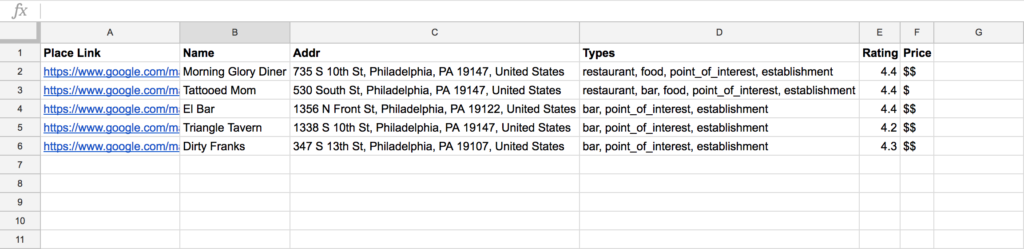
-
painting clouds with clojure
Over the 4th of July weekend I made this little program to generate images of clouds










(ns clouds.core (:gen-class) (:import [java.awt.image BufferedImage] [java.io File] [javax.imageio ImageIO] [javax.swing JPanel JFrame SwingUtilities] [java.awt Graphics Color Dimension RenderingHints])) (def width 500) (def height 500) (def num-particles 1000000) (def color-cache (atom {})) (def output-image? true) (defn- rand-between [min max] (+ (rand-int (- max min)) min)) (defn- make-gray-color [color-val alpha] (let [color-key (keyword (str color-val "-" alpha)) cached-color (color-key @color-cache)] (if cached-color cached-color (let [^Color new-color (Color. color-val color-val color-val alpha)] (swap! color-cache assoc color-key new-color) new-color)))) (defn- paint-clouds [^Graphics graphics] (loop [n 0 last-x (rand-int width) last-y (rand-int height)] (let [rand-op (if (< (rand) 0.5) inc dec) rand-axis (if (< (rand) 0.5) :vert :horiz) new-x (if (= rand-axis :horiz) (rand-op last-x) last-x) new-y (if (= rand-axis :vert) (rand-op last-y) last-y) rand-gray (rand-between 250 255) rand-alpha (rand-int 75) neighbor-alpha-modifier 0.11 particle-color (make-gray-color rand-gray rand-alpha) neighbor-color (make-gray-color rand-gray (int (* rand-alpha neighbor-alpha-modifier)))] (doall (for [x-offset (range -1 2) y-offset (range -1 2) :let [x (+ new-x x-offset) y (+ new-y y-offset)] :when (and (<= 0 x width) (<= 0 y height) (or (= x-offset y-offset 0) (not= x-offset y-offset)))] (let [^Color color (if (= x-offset y-offset 0) particle-color neighbor-color)] (doto graphics (.setColor color) (.drawLine x y x y))))) (when (< n num-particles) (recur (inc n) new-x new-y))))) (defn- painter [] (proxy [JPanel] [] (paint [^Graphics graphics] (let [^int width (proxy-super getWidth) ^int height (proxy-super getHeight)] (doto graphics (.setRenderingHint RenderingHints/KEY_ANTIALIASING RenderingHints/VALUE_ANTIALIAS_ON) (.setRenderingHint RenderingHints/KEY_INTERPOLATION RenderingHints/VALUE_INTERPOLATION_BICUBIC) (.setColor (Color. 135 206 250)) (.fillRect 0 0 width height)) (paint-clouds graphics))))) (defn- gen [] (let [^JPanel painting-panel (painter) ^Dimension dim (Dimension. width height)] (doto painting-panel (.setSize dim) (.setPreferredSize dim)) (if output-image? (let [^BufferedImage bi (BufferedImage. width height BufferedImage/TYPE_INT_ARGB) ^Graphics graphics (.createGraphics bi)] (.paint painting-panel graphics) (ImageIO/write bi "png" (File. (str "output/" (System/currentTimeMillis) ".png")))) (let [^JFrame frame (JFrame. "clouds")] (.add (.getContentPane frame) painting-panel) (doto frame (.pack) (.setVisible true)))))) (defn -main [& args] (gen)) -
Getting average motorcycle price across all Craigslist cities
Today I’m going to look at a motorcycle that’s for sale on Craigslist. The asking price for the bike seems fair, but I wanted to get a sense for what other people were asking for the same model and year.
First I did a local search for the motorcycle I was interested in using the year, make and model search filters. The resultant URL was
https://philadelphia.craigslist.org/search/mcy?srchType=T&auto_make_model=suzuki+TU250X&min_auto_year=2012&max_auto_year=2012This returned all the listings in Philadelphia for a 2012 Suzuki TU250X. The srchType=T parameter filters to only include results that have a match in the listing title.
Using pup, a command-line tool for parsing HTML, I extracted the asking price of the motorcycle in the search result listing.
curl -s "https://philadelphia.craigslist.org/search/mcy?srchType=T&auto_make_model=suzuki+TU250X&min_auto_year=2012&max_auto_year=2012" | \
pup 'ul.rows li.result-row p.result-info span.result-meta span.result-price text{}'
There is a CL page that lists every Craigslist site in the US. I parsed that for each location’s specific URL.
curl -s "https://geo.craigslist.org/iso/us" | \
pup 'div.geo-site-list-container a attr{href}'
I combined these
curl -s "https://geo.craigslist.org/iso/us" | \
pup 'div.geo-site-list-container a attr{href}' | \
while read location;
 do curl -s "$location/search/mcy?srchType=T&auto_make_model=suzuki+TU250X&min_auto_year=2012&max_auto_year=2012" | \
 pup 'ul.rows li.result-row p.result-info span.result-meta span.result-price text{}';
done
which outputs the asking prices…
$3800
$2750
$2800
$2950
$3800
$3750
$2800
$2400
$2750
$2950
$2750
$3800
$3750
$2700
$2400
...
I was then able to see how the price of the motorcycle in which I was interested compared to similar bikes throughout the US.
-
Resume
I just updated my resume – the latest version of it should be viewable here.
For this iteration of resume-writing I decided to try out the open-source JSON Resume schema and tooling. So far it’s OK. My only complaints are:
- No markdown export support, despite the docs mentioning it
- PDF exports are pretty gross
- Can’t export using a local theme, though there’s an open issue about this
To get a PDF version of my resume I ended up just writing it in markdown and then using pandoc to generate a PDF from that. I’m wondering if just using markdown and pandoc would be a better option in the long term, but we’ll see. It’s nice having a resume under vcs though :)